原理
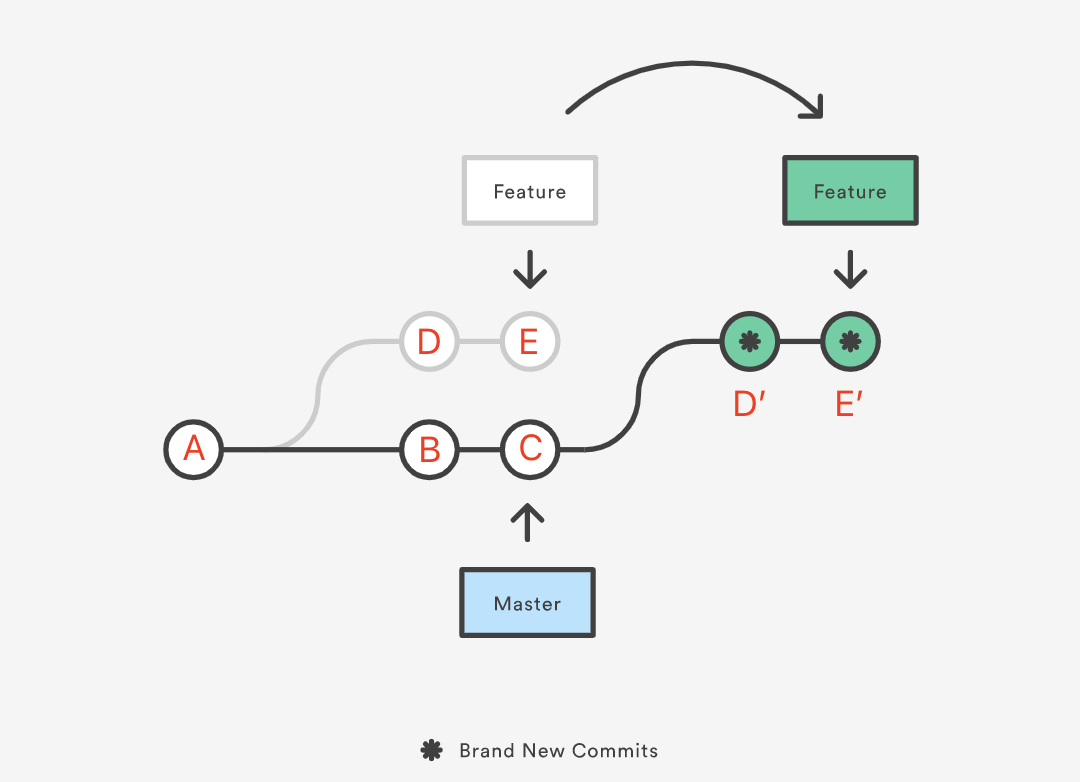
git rebase 的原理如图(在 Feature 分支上执行 git rebase Master ):
git rebase 的指令格式如下:
git rebase [commit]一般而言,我们在 feature 分支上执行 git rebase master ,我们会让 feature 上的 commits,在 master 上 replay,这种过程看上去就像 feature 的所有工作的基(原本是 base )变成了 master ,是为“变基”。示意图如下:
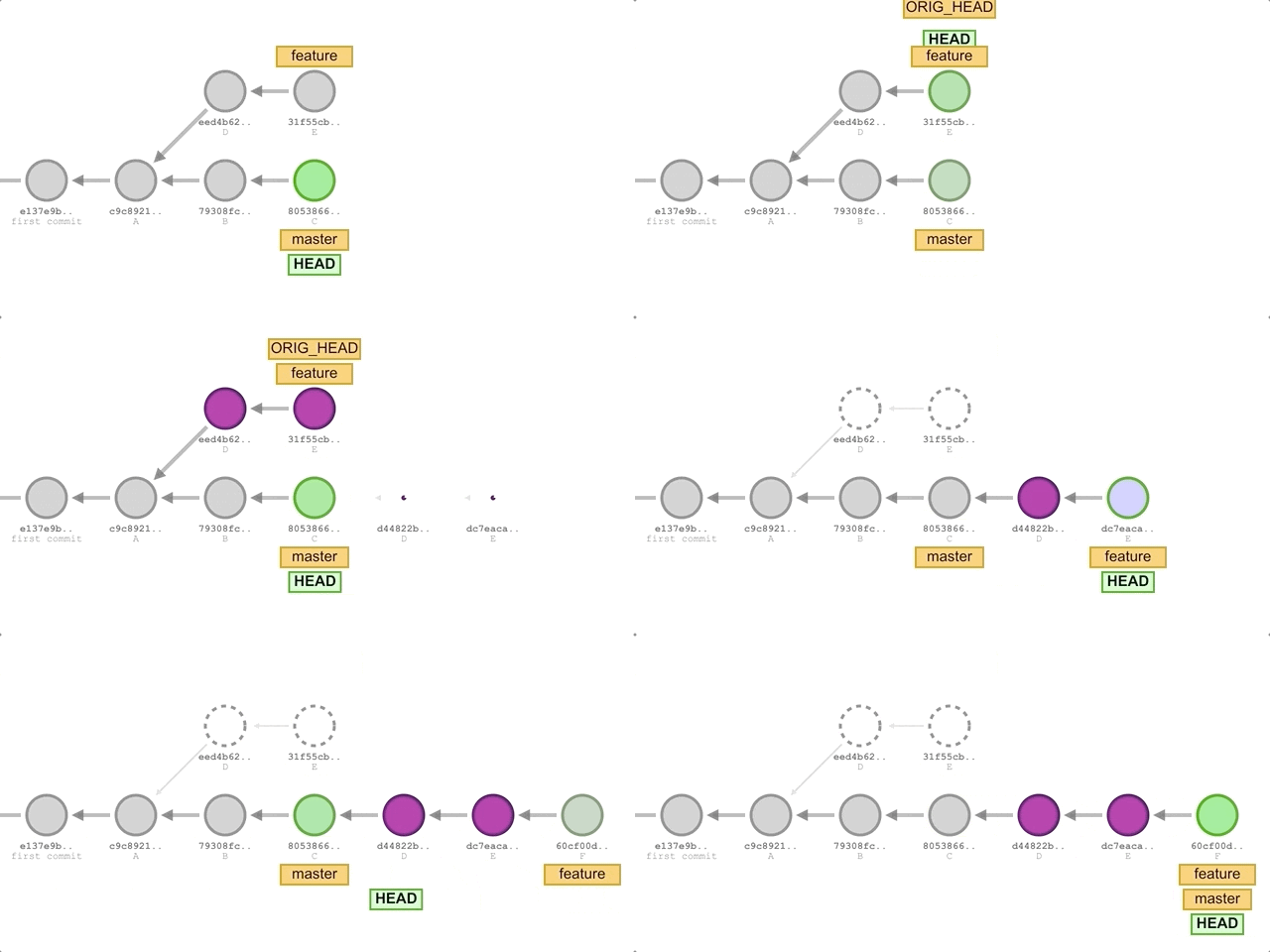
注意在这个过程中,我们改变的是 feature 分支,而不是 master 分支。
因为 git rebase 的 “重播” 特性,所以我们常常在重播过程中整一些花活,比如说压缩多个 commit ,或者删除一些 commit 。
Rebase Conflict
我们 git pull --rebase 时,本质上是先用 git fetch 更新 origin 标签,然后再在 local 分支上执行 git rebase origin 的命令。相当于我们将 local 上不同于 origin 的修改都重播到 origin 上。
当然只要是 pull ,就会有冲突,对于 git merge 来说,处理冲突就是将冲突解决后形成一个新的 commit 即可:
git add [conflict-file]
git commit -m "conflict-solved"
而对于 git rebase 来说,并不需要形成一个新的 commit ,只需要进行如下命令即可:
git add [conflict-file]
git rebase --continue
为什么这里的修改不需要形成一个新的 commit 了?因为 rebase 重播的过程就是形成一个个 commit 的过程,当有一个 commit 无法形成的时候,那么就会冲突,重播就会停下,我们将冲突修复并 add 后,自然就可以用 --continue 命令让它继续重播下去了。
线性历史
我们常说要保证 master 上要是线性历史,那么我们该怎么操作呢?当 feature 相比于 master 上有新特性的时候,如果使用 git merge 就有可能会出现非线性的部分。
那如果我们在 master 分支上直接使用 git rebase feature 呢?这样 master 分支上就可以让 master上有 feature 的 commit 了。但是这种方式,会彻底改变 master 分支上的 commit,而在其他开发者的 commit 并没有被修改,这种差异是没有办法弥合的。
所以我们应该在 feature 分支上使用 git rebase master,这样所有 feature 上的 commits 就放到了 master 上,而 master 上的 commits 并没有被改变。但是此时 master 并没有改变,所以我们再在 master 分支上使用 git merge feature ,就可以让 master 进行一个只 fast-forward 的分支,相当于让 master 沿着线性历史,与 feature 对齐了。
交互式 rebase
这是 rebase 的又一个高级功能,它强调的是把要 rebase 的一组 commit ,一个接着一个 commit 的 replay 到 base 上。在 replay 的过程中,你可以在任何一个 commit 停下,做出一些修改,然后再进入下一个测试。
那么具体这个过程要怎么操作呢?依然非常抽象,首先我们需要使用命令:
git rebase -i HEAD~5这样我们就可以 replay 当前分支上最近的五个 commit ,之所以使用 HEAD~5 这种形式,而不是 main 这种分支,是因为交互式的 rebase 往往被用于修改一组 commit 的内容,而不再是原来的“将多个 feature 合并整理到一起”的语义。
执行命令后会出现一个可以用 vim 进行编辑的 buffer,如下所示:
pick 4af00ab # feat(ALL): migrate from compression to sparsity
pick a12d2af # feat(eval): enlarge the plot fonts
pick 2013cd1 # feat(ALL): refine the layouts
pick 45797f0 # chore(bg): merge two sections
pick 179280b # chore(overview): list the goals

# Rebase efc9766..179280b onto efc9766 (5 commands)
#
# Commands:
# p, pick <commit> = use commit
# r, reword <commit> = use commit, but edit the commit message
# e, edit <commit> = use commit, but stop for amending
# s, squash <commit> = use commit, but meld into previous commit
# f, fixup [-C | -c] <commit> = like "squash" but keep only the previous
#                    commit's log message, unless -C is used, in which case
#                    keep only this commit's message; -c is same as -C but
#                    opens the editor
# x, exec <command> = run command (the rest of the line) using shell
# b, break = stop here (continue rebase later with 'git rebase --continue')
# d, drop <commit> = remove commit
# l, label <label> = label current HEAD with a name
# t, reset <label> = reset HEAD to a label
# m, merge [-C <commit> | -c <commit>] <label> [# <oneline>]
#         create a merge commit using the original merge commit's
#         message (or the oneline, if no original merge commit was
#         specified); use -c <commit> to reword the commit message
# u, update-ref <ref> = track a placeholder for the <ref> to be updated
#                       to this position in the new commits. The <ref> is
#                       updated at the end of the rebase
#
# These lines can be re-ordered; they are executed from top to bottom.
#
# If you remove a line here THAT COMMIT WILL BE LOST.
#
# However, if you remove everything, the rebase will be aborted.
可以看到里面的内容是一组 operator + commit_id 的列表。我们需要用 vim 把 operator (默认是 pick)改成我们希望的。我一般是用交互式 rebase 去改 commit message ,所以我用 reword 比较多。
再修改结束退出后,就可以自动化完成了,所以其实并没有那么交互式。